
Zandrokun | ZArchiver adalah aplikasi Android yang diranncang khusus sebagai aplikasi pengestrak/ekstraktor yang mudah, cepat, dan simpel....
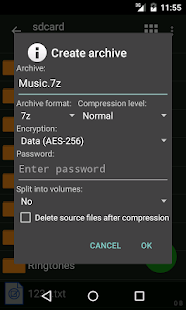
– Create the following archive types: 7z (7zip), zip, bzip2 (bz2), gzip (gz), XZ, tar;
– Decompres the following archive types: 7z (7zip), zip, rar, rar5, bzip2, gzip, XZ, iso, tar, arj, cab, lzh, lha, lzma, xar, tgz, tbz, Z, deb, rpm, zipx, mtz, chm, dmg, cpio, cramfs, img (fat, ntfs, ubf), wim, ecm, arc (freearc);
– View archive contents: 7z (7zip), zip, rar, rar5, bzip2, gzip, XZ, iso, tar, arj, cab, lzh, lha, lzma, xar, tgz, tbz, Z, deb, rpm, zipx, mtz, chm, dmg, cpio, cramfs, img (fat, ntfs, ubf), wim, ecm, arc (freearc);
– Create and decompress password-protected archives;
– Edit archives: add/remove files to/from the archive (zip, 7zip, tar, apk, mtz);
– Create and decompress multi-part archives: 7z, rar(decompress only);
– Partial archive decompression;
– Open compressed files;
– Open an archive file from mail applications;
– Extract splited archives: 7z, zip and rar (7z.001, zip.001, part1.rar, z01);
Key features:
– Multithreading support (useful for multicore processors);
– UTF-8/UTF-16 supporting in filenames. Allows you to use national symbols in filenames;
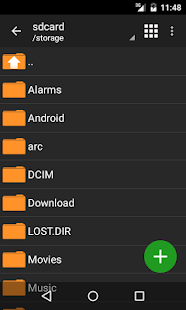
– No need for enabling multiselect mode. You can select files by clicking on the icon from the left of the filename;
Benefits of Pro version :
Support for external memory and MicroSD
Dark and light themes;
Storage of passwords;
Preview images in the archives;
Modification of files in the archive (archiver, after returning to the application checks whether the modified open files directly from the archive and offers to update them in the archive).
Informasi Apk :
Nama : ZArchiver Pro
Versi Saat Ini : 0.8.4
Size : 3.4 MB
Android : 2.3 / 4.0 and up
Mode : Offline
Playstore : CEK
Download Link :
Gak paham sama beberapa bahasanya gan
BalasHapusoh iya maaf ya gan, ini belum saya artikan, yang jelas ini apk buat mengekstrak .zip , .rar , .7z , dll.
BalasHapus